-
How to Create, Query, Delete, and Modify Oracle Views | Materialized View GuideBrawny Develop/EN_Practical Development Basics_Query 2025. 9. 3. 15:29
In Oracle, a View is a logical object that allows developers to simplify complex queries and treat them like a virtual table.
Unlike a physical table, a view does not store data itself but always returns the latest data from the underlying base tables whenever it is queried.
This makes views very useful for reusing complex SQL statements, hiding sensitive columns for security, and ensuring logical independence when the base table structure changes.
On the other hand, a Materialized View actually stores the query result in the database, which provides performance benefits but requires periodic refresh to synchronize with the source data.
🔹 Creating a View
- CREATE VIEW: Creates a new view.
- OR REPLACE: Replaces the existing view if it already exists.
- WITH CHECK OPTION: Prevents inserting or updating rows that do not meet the view’s condition.
- WITH READ ONLY: Makes the view read-only so no DML can be performed.
🔹 Querying a View
You can check which views exist and review their definitions using system catalog views.
- USER_VIEWS: Lists the views created by the current user.
- ALL_VIEWS: Lists the views accessible to the user.
- DBA_VIEWS: Shows all views in the database (requires DBA privileges).
🔹 Deleting a View
To remove a view definition, use the DROP statement.
Dropping a view only removes its definition. It does not affect the underlying base table data.
🔹 Modifying a View
There is no direct command like ALTER VIEW to change a view. Instead, you must redefine it with CREATE OR REPLACE VIEW.
This overwrites the existing view definition with the new one.
🔹 What is a Materialized View?
A Materialized View (MV) is different from a regular view because it physically stores the result of the query.
This means that querying an MV can be much faster, especially for complex joins and aggregations.
However, the data in a Materialized View does not automatically update in real time.
To stay synchronized with the base tables, it must be refreshed periodically.
🔹 Creating a Materialized View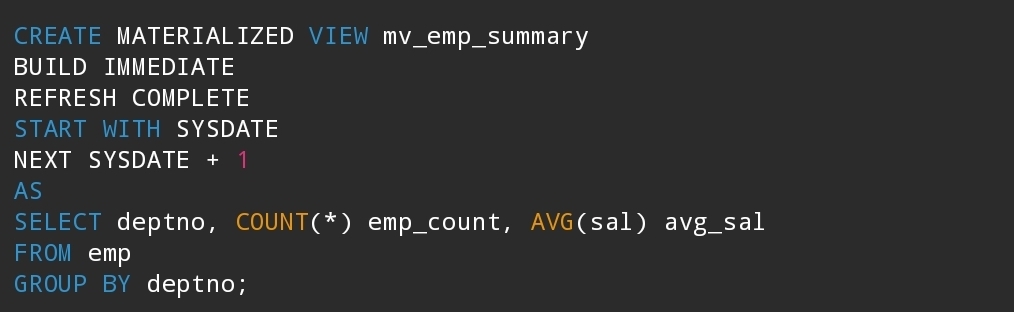
- BUILD IMMEDIATE: Populates the data at creation time.
- REFRESH COMPLETE: Reloads the entire query result when refreshing.
- REFRESH FAST: Refreshes only the incremental changes (requires MV log).
- REFRESH FORCE: Uses FAST refresh if possible, otherwise falls back to COMPLETE.
START WITH / NEXT: Defines an automatic refresh schedule.
🔹 Refreshing a Materialized View
- Manual refresh: Explicitly refresh when needed.
- Scheduled refresh: Defined with START WITH and NEXT options.
- ON COMMIT refresh: Refreshes immediately upon transaction commit in the base table, but can introduce performance overhead.
🔹 Deleting a Materialized View
🔹 Summary
A regular View is a virtual table that always reflects the latest base table data but does not store results.
A Materialized View physically stores query results, which improves performance but requires refresh management.
Best practices: Use Views for query simplification and security. Use Materialized Views for heavy reporting, aggregation, or when performance optimization is required.'Brawny Develop > EN_Practical Development Basics_Query' 카테고리의 다른 글